Margin control for Shopify

A profitable product can still become an unprofitable order.

Discounts and costs can turn a good sale into a margin problem. Revdrift checks Shopify orders against your target and shows which need attention before fulfillment—with optional pauses for eligible orders backed by complete, confirmed data.

Illustrative example · Sample data

One order · USD · Before fulfillment

Sale before discount
$120
Discount
−$20
Product cost
−$40
Fulfillment cost
−$8
Payment cost
−$3
Marketing cost
−$15
Contribution left
$34
40%margin target
34%order margin
Your margin target. The numbers behind every flag.See how Revdrift works

01 / Where margin disappears

Catch the margin miss while you can still act.

A stale product cost, an extra discount, or unexpected fulfillment expense can wipe out margin after an order is placed. Most stores do not see it until later, and then the same mistake happens again.

See which orders fall below your target, check the costs and discounts behind each flag, and decide what to do next. A flag is a reason to review—not proof of what caused the problem.

02 / How Revdrift works

Three steps from your margin rule to a clear order review.

  1. 01

    Set your margin rule

    Add the product, fulfillment, payment, and marketing costs that determine what a healthy order looks like.

  2. 02

    Let Revdrift check each order

    Revdrift compares the sale after discounts with your costs and shows how much margin is left.

  3. 03

    Review what needs attention

    Check the numbers, alert the right people, and decide what to do. Optional automatic pauses apply only to eligible fulfillment when complete, confirmed data shows an order below your target.

03 / Start where you are

Start with the costs you know. See what is missing.

You choose the margin target and whether to enable automatic protection.

You have your settings

Put your current margin rules to work.

Bring the product, fulfillment, payment, and marketing costs you trust, along with your target margin. Revdrift checks each new order against the rules you confirm.

Talk through your setup
You are still building them

Find the gaps before you rely on the result.

Connect Shopify, review your catalog, and decide what you want to protect. Missing or estimated costs stay clearly marked as a warning; they never create an automatic fulfillment pause.

Talk through setup

04 / Inside Revdrift

A clear operating view inside Shopify Admin.

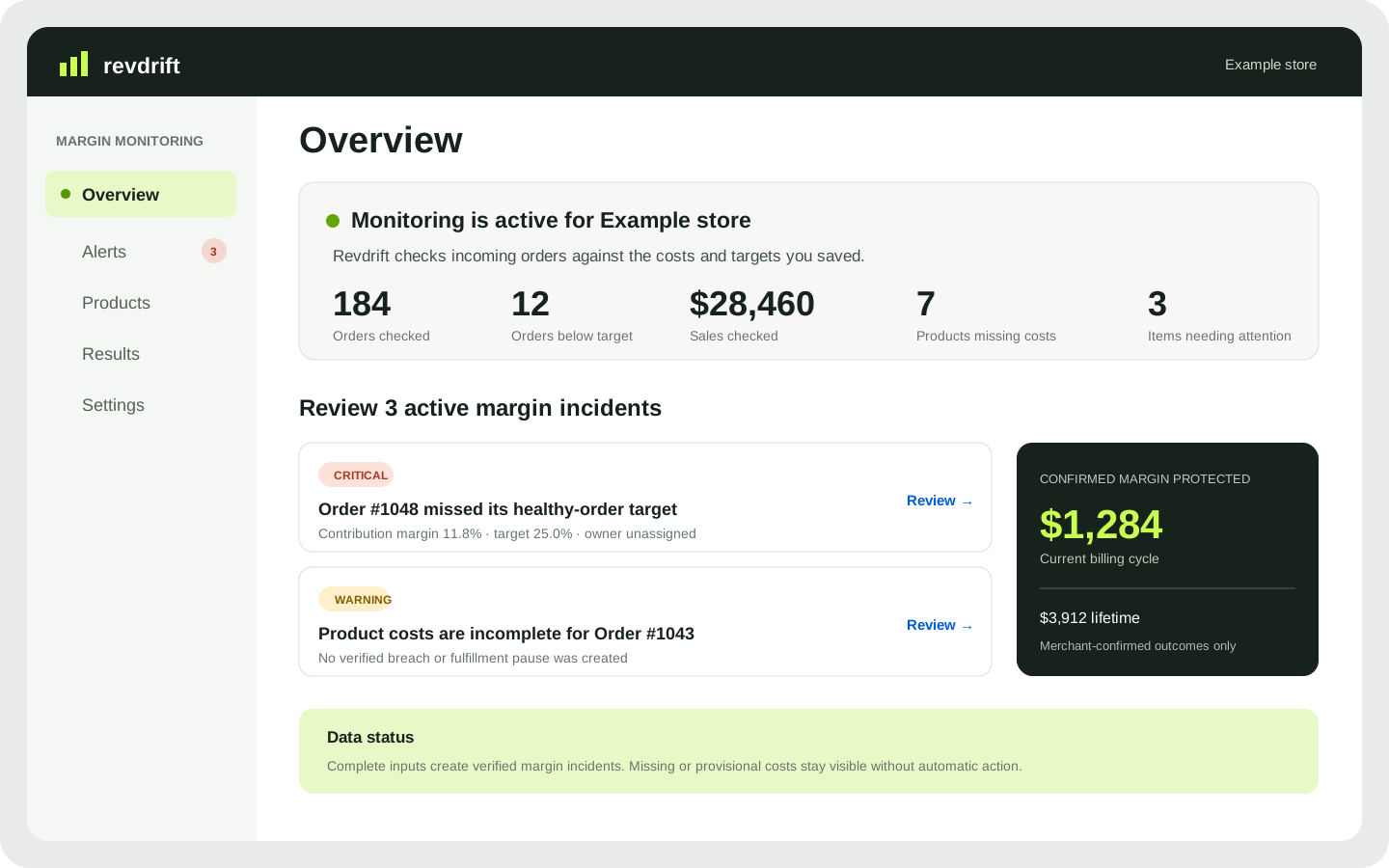
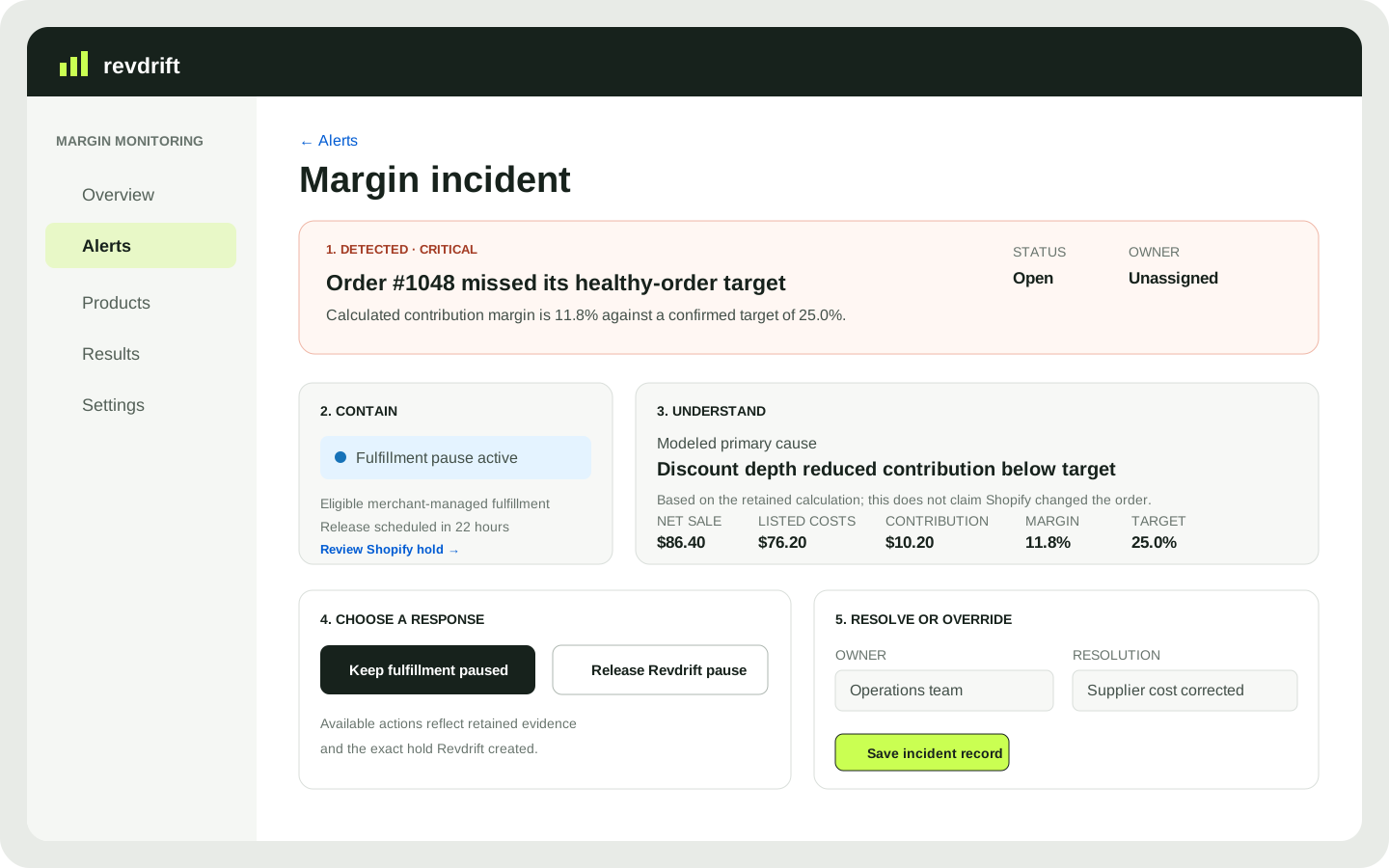
Illustrative examples with sample data—not app screenshots or customer results. Revdrift runs inside Shopify Admin; available actions depend on your store and data.

Concept illustration of Revdrift Overview: monitoring metrics, active margin incidents, and merchant-confirmed outcomes
OverviewIllustrative example · Sample data. See monitoring status, orders below target, missing product costs, active incidents, and merchant-confirmed results.
Concept illustration of a Revdrift margin incident with detection, containment, retained calculation, response, owner, and resolution
Margin incidentIllustrative example · Sample data. See why an order was flagged, who is reviewing it, and how it was resolved.

05 / What your team gets

Know what happened.
Decide what happens next.

A

Clear order math

See the sale after discounts, each listed cost, the money left, and the resulting margin.

B

Protection based on complete data

Missing or estimated costs create a warning. They never trigger an automatic fulfillment pause.

C

A record your team can trust

Assign an owner, record the decision, and keep the order math and resolution together.

Designed for Shopify Admin

Margin protection where your team already works.

Review flagged orders inside Shopify Admin. Automatic protection is optional: it can pause eligible merchant-managed fulfillment only when complete, confirmed data shows a margin miss. Revdrift releases only the pauses it created.

Tell us about your store

06 / Let’s talk

Find the orders that miss your margin target.

Start with a conversation with the Code Mountain team about your costs, discounts, and fulfillment workflow. We’ll help you assess whether Revdrift fits and identify which cost inputs need confirming before you rely on the results.

Need product support? Visit support

This opens a draft in your email app; send it to start the conversation. We use your details only to respond to this inquiry.